This post will be very helpful for the developers who are new
and are looking for an example on how to use a functions with an example
. Usually any developer who is very new to Dynamics AX will go to AOT
>> System Documentation >> functions and will select a
function >> right clicks and use edit option to get help on the
function and example if any.
Well, I know its very boring way to go always to that level and get help. I have modified Editorscripts class again to get quick help in the editor itself.
All you need to do is add the below method “ShowExample” to the EditorScripts class
public void ShowExample(Editor editor)
{
str line;
int i;
int startLine = editor.selectionStartLine();
int endLine = editor.selectionEndLine();
int startCol = editor.selectionStartCol(); //points at the first selected char
int endCol = editor.selectionEndCol()-1; //points at the last selected char
MarkMode markMode = editor.markMode();
#define.maxLineLength(300)
#AOT
Form formBrowse;
FormHTMLControl htmlControl;
FormRun formRun;
Args args;
str htmlContent;
TreeNode functionTreeNode;
Editor _editor = editor;
str h1Tag;
void transform(str _function)
{
;
functionTreeNode = TreeNode::findNode(#SystemFunctionsPath+’\\’+_function);
if (!functionTreeNode)
throw error (“Function not found in System documentation”);
formBrowse = new Form(‘Function Example’, true);
formBrowse.design().caption(_function + ” Example”);
formBrowse.design().width(700);
formBrowse.design().height(500);
formBrowse.design().addControl(FormControlType::HTML, ‘html’);
args = new Args(formBrowse.name());
args.name(formBrowse.name());
args.object(formBrowse);
formRun = classFactory.formRunClass(args);
formRun.init();
htmlControl = formRun.design().controlName(‘html’);
htmlControl.height(1,1);
htmlControl.width(1,1);
formRun.run();
htmlControl.setText(functionTreeNode.AOTgetSource());
formRun.detach();
}
void transformLine(int lineNo, int start, int end)
{
_editor.gotoCol(0);
_editor.gotoLine(lineNo);
line = _editor.currentLine();
transform(substr(line, start, end-start+1)) ;
return;
}
;
editor.unmark();
switch (markMode)
{
case MarkMode::LineMark:
editor.gotoCol(1);
for (i=startLine; i<=endLine; i++)
{
transformLine(i, 1, #maxLineLength);
}
break;
case MarkMode::ColMark:
for (i=startLine; i<=endLine; i++)
{
transformLine(i, startCol, endCol);
}
break;
case MarkMode::AreaMark:
if (startLine == endLine)
{
transformLine(startLine, startCol, endCol);
}
else
{
//convert first line
transformLine(startLine, startCol, #maxLineLength);
//convert full lines
for (i=startLine+1; i<endLine; i++)
{
transformLine(i, 1, #maxLineLength);
}
//convert last line
transformLine(endLine, 1, endCol);
}
break;
}
}
Wondering how to use it now.
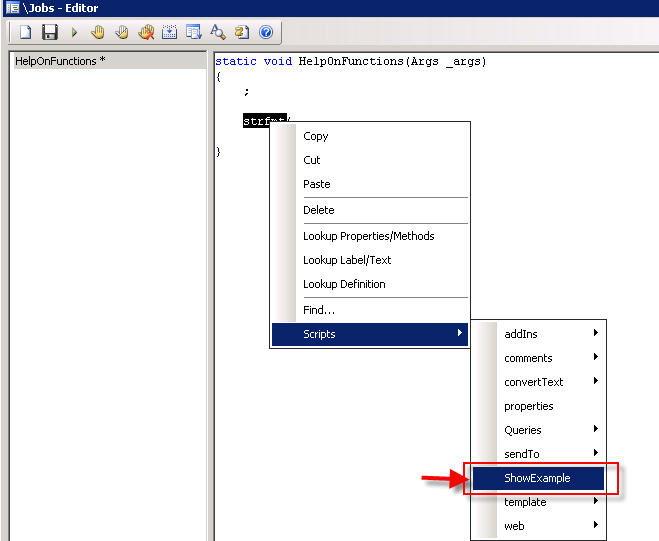
Create a new job and write any function. In the below example I have shown this by using strfmt function. Double click the function and select scripts button>> Show example as shown below

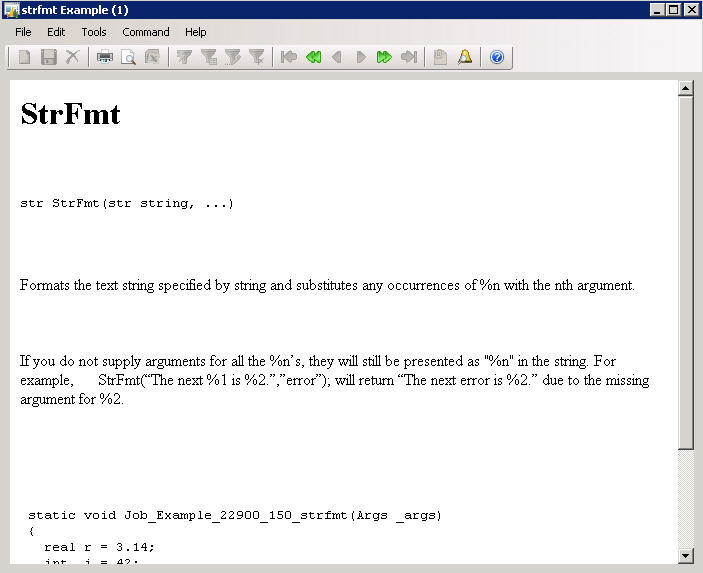
There you go. you will get help on how to use this function with an example on your screen. Isn’t it helpful?? Below is the output form which gives you quick help on the functions. You can get the help for any function which is defined in system documentation.

Well, I know its very boring way to go always to that level and get help. I have modified Editorscripts class again to get quick help in the editor itself.
All you need to do is add the below method “ShowExample” to the EditorScripts class
public void ShowExample(Editor editor)
{
str line;
int i;
int startLine = editor.selectionStartLine();
int endLine = editor.selectionEndLine();
int startCol = editor.selectionStartCol(); //points at the first selected char
int endCol = editor.selectionEndCol()-1; //points at the last selected char
MarkMode markMode = editor.markMode();
#define.maxLineLength(300)
#AOT
Form formBrowse;
FormHTMLControl htmlControl;
FormRun formRun;
Args args;
str htmlContent;
TreeNode functionTreeNode;
Editor _editor = editor;
str h1Tag;
void transform(str _function)
{
;
functionTreeNode = TreeNode::findNode(#SystemFunctionsPath+’\\’+_function);
if (!functionTreeNode)
throw error (“Function not found in System documentation”);
formBrowse = new Form(‘Function Example’, true);
formBrowse.design().caption(_function + ” Example”);
formBrowse.design().width(700);
formBrowse.design().height(500);
formBrowse.design().addControl(FormControlType::HTML, ‘html’);
args = new Args(formBrowse.name());
args.name(formBrowse.name());
args.object(formBrowse);
formRun = classFactory.formRunClass(args);
formRun.init();
htmlControl = formRun.design().controlName(‘html’);
htmlControl.height(1,1);
htmlControl.width(1,1);
formRun.run();
htmlControl.setText(functionTreeNode.AOTgetSource());
formRun.detach();
}
void transformLine(int lineNo, int start, int end)
{
_editor.gotoCol(0);
_editor.gotoLine(lineNo);
line = _editor.currentLine();
transform(substr(line, start, end-start+1)) ;
return;
}
;
editor.unmark();
switch (markMode)
{
case MarkMode::LineMark:
editor.gotoCol(1);
for (i=startLine; i<=endLine; i++)
{
transformLine(i, 1, #maxLineLength);
}
break;
case MarkMode::ColMark:
for (i=startLine; i<=endLine; i++)
{
transformLine(i, startCol, endCol);
}
break;
case MarkMode::AreaMark:
if (startLine == endLine)
{
transformLine(startLine, startCol, endCol);
}
else
{
//convert first line
transformLine(startLine, startCol, #maxLineLength);
//convert full lines
for (i=startLine+1; i<endLine; i++)
{
transformLine(i, 1, #maxLineLength);
}
//convert last line
transformLine(endLine, 1, endCol);
}
break;
}
}
Wondering how to use it now.
Create a new job and write any function. In the below example I have shown this by using strfmt function. Double click the function and select scripts button>> Show example as shown below
There you go. you will get help on how to use this function with an example on your screen. Isn’t it helpful?? Below is the output form which gives you quick help on the functions. You can get the help for any function which is defined in system documentation.